

UPDATE: F1TV is now cracking down on VPN use. Some still work, but it just depends on the server. You might have try server by server. Still, we’ve found a couple of ways you can still watch F1TV despite the VPN ban.
As part of the ‘how to save money with a VPN’ series, I’m turning my attention to Formula 1.
I’ve been an F1 fan since the since the early 90s, and used to watch every race live. Yes, even the 4 a.m. starts at the Japanese Grand Prix. When F1 switched to Sky in 2013, I forced to find other ways to watch the races live. Usually visiting friends with a Sky subscription, watching in pubs or bars, or borrowing a relative’s account. All of which were something of a hassle.
F1TV Pro launched in 2018 to much excitement from fans around the world. Unfortunately, in countries such as the UK that excitement was short lived when it was revealed that that the new streaming F1 service would be available in countries that already had broadcasting rights.
In the UK Sky has the rights to broadcast F1 races, fans without a Sky Sports subscription have to make do with race highlights on channel 4. For hardcore fans, that just isn’t an option, so in this guide I’ll show you how you can subscribe to F1 TV Pro in the UK and watch all races live without a Sky subscription.
What is F1 TV?
F1 TV is a subscription based online streaming service operated by Formula One (owned by Liberty Media). It allows viewers to watch live and on-demand coverage of Formula One races, as well as exclusive documentaries, interviews, and behind-the-scenes content.
The service is available in select countries and offers different tiers of subscription with varying features and content.
F1 TV Access – this tier is available in most countries and territories. It provides live timing, on-demand videos and content including race replays in some territories. The subscription costs £19.99 is the only subscription available in the UK. In my opinion it’s not worth it, unless you are happy to only watch heavily delayed race replays.
F1 TV Pro – this is the subscription we want. F1 TV Pro offers live streaming of all 23 F1 races, including all practice sessions, qualifying, and sprints. It also offers live timing, behind the scenes content, as well a pre and post race shows. It’s the gold standard of F1 broadcasting, and of course isn’t available in the UK due to Sky having exclusive rights to live F1 broadcasts, but I’m going to show you how to get around that.
In the EU countries it is available a year’s subscription costs around €70 (£61), but if you follow the steps below you should be able to get it for less than £45 a year. Compare that with £26 a month for Sky’s most basic package, and an additional £18 a month for Sky Sports F1, and the savings are huge.
How to sign up to F1 TV Pro UK
There are two main barriers to signing up to F1 TV Pro in the UK.
First is the geo-restriction. The app or website checks your IP address. If it detects that you are trying to access the service from a country where F1 TV Pro isn’t available, it will only allow you to sign up to the TV Access package.
The second, is the payment restriction. The F1 TV website checks the first six digits of your credit or debit card. These contain a country identifier, which F1 TV then uses to block payment from restricted countries.
Fortunately, there easy way around both of these restrictions as I’ll explain below:
First to get around the geo-restriction you’re going to need to use a VPN that has services in one of the countries where F1 TV Pro is available such as Netherlands, Greece, Bulgaria, Mexico, USA, etc..
You’ll need to use this VPN not just to sign up to F1 TV, but every time you log in to watch a race, so be sure to choose a reliable one. My personal recommendation is Proton VPN. They have a free offering, but you’ll the paid version for access to fast servers capable of streaming F1. It really is a cut above the rest.
Otherwise, NordVPN, Express VPN, AirVPN can be used. They all have apps or configurations that work on mobile phones, PCs and Macs.
Configure the VPN on your device. In the first instance I recommend using a mobile phone or tablet (you’ll see why later).
With the VPN set up, select a server from a non-restricted country. Netherlands is the closest to the UK so should be the fastest, but Mexico is cheaper.
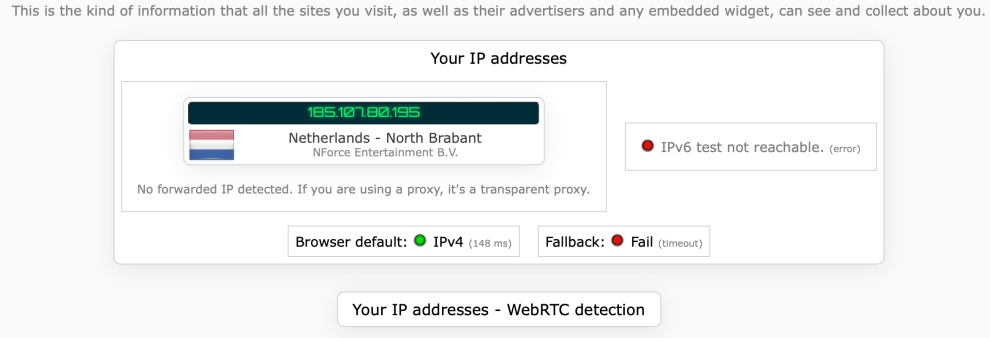
Visit ipleak.net to check that your VPN is working. You should see your chosen country (in my case Netherlands), similar to the image below.
Now that you’ve confirmed your VPN is working, download the F1 TV app from Google Play, or Apple App Store, and create a new F1 TV account. Note, you will be charged in that counties currency, so to avoid getting stuck with foreign exchange fees or loading, make sure the card linked to your Google or Apple account is one of the best credit or debit cards for spending abroad, such as Starling, or Monzo etc..
Using the F1 TV app on either iOS or Android, pay for your F1 TV subscription using either Apple Pay or Google Pay. Note: Do not enter your credit or debit card manually. This will be rejected.
Now that your account has been created and paid for, you can enjoy F1 TV Pro in the UK on any device so long as it is connected to your VPN.
Streaming F1 TV Pro to my TV
If you want to watch F1 TV Pro on your TV, you’ll need to physically connect your device to your TV as casting won’t work while your device and your TV are on different networks.
Many android phones can output to a TV via HDMI. You’ll fist need a USB-C to HDMI adapter though. Apple users can use Apple’s Lightning Digital AV adapter for the iPhone and older iPads, or Apple’s USB-C Digital AV Multiport adapter for iPads or Macbooks.
The F1 TV app is also available on Apple TV, Google TV, Fire TV and Roku, making watching the F1 on your TV even easier. The only caveat is that you’ll need to connect these devices to your VPN.
F1TV blocking VPNs
Just before the summer break in the 2023 season F1TV started getting tougher on VPNs and many found their favourite VPN no longer worked with the service. Until the VPNs catch up, and change IP address or similar there is no direct work around for this. If you find a VPN and server that is working you are advised not to publicise it, as it may subsequently be picked up and banned.
How to still watch F1TV despite the VPN ban
One method that still works is to setup a VPN on your router from a country compatible with F1TV Pro.
Then on the device you want to watch F1TV, set up a second VPN such as Cloudflare Warp on that device. The reason you can’t use Warp alone is that it doesn’t hide your IP address and always defaults to your current country i.e. the UK.
By connecting the device you want to watch on to a router or computer already connected to VPN, forces Warp to use the VPN country for its servers instead.
Crucially, in this case Cloudflare servers aren’t blocked by F1TV and given how prevalent Cloudflare is across the web, they are highly unlikely to be blocked soon.
What if my router doesn’t have VPN settings? (Best routers for F1TV Pro)
If you have the default router from Virgin or most large UK ISPs you’ll likely find that it’s locked down or simply just don’t have any VPN settings. In this case, you could use a computer to connect to your first VPN then share that connection with the device you want to watch F1TV Pro on.
Better yet, pick up a cheap travel router and use that specifically for your VPN. There are a number of good ones, but fast easy set up and low cost we recommend the GL.iNet GL-AR300M at £30 from Amazon as a cheap mini-travel router that will get the job done.
Alternatively, if you want to spend a little more for better VPN speeds and faster wifi, then the GL.iNet GL-MT1300 (Beryl) at £69 is an excellent choice, and one that I personally use for this very purpose.
Additional ways to watch F1TV Pro without a VPN
There are a few things you can try, but none ideal.
Firstly, take a look at the section below to see national broadcasters streaming F1 for free.
Secondly, you could use an app like StreamLocator which is specifically designed to get around streaming geo-restrictions. It not only covers F1TV but also services such as Netflix, Disney, iPlayer, and more.
The downside is the price. The app is free for 7 days, then costs $4.99 a month. They also sell a hub, but you don’t need that. We tested the app during the Hungaroring and Dutch GP Practice, and it works well. You just need to make sure you select USA as your country before launching the F1TV app.
How to watch live F1 for free in the UK (without F1TV)
While the main reason for this article was to show people how to watch F1 via F1 TV Pro which is usually unavailable in the UK, there are free legal ways to watch live F1 races without a subscription at all.
Austrian broadcasters Servus TV (owned by RedBull) and ORF (national broadcaster) stream all 23 Formula 1 races live between them. Both can be accessed using a VPN connected to an Austrian server such as Proton VPN which has 16 Austrian servers, or Nord VPN which has 14.
The main disadvantage of this is that the commentary for the races will be German. Even if you speak German it might not provide be the most riveting description of the races. I remember watching F1 while in Vienna many years ago. Back then ORF was the only broadcaster, and only had a single commentator the whole race. No pundits, no co-commentator, and no pitlane reporters. That may have changed, now. If it has please let me know in the comments below.
Is it legal to watch F1 TV Pro in the UK with a VPN?
Yes. It is perfectly legal to use a VPN to watch geo-restricted content in the UK. For most streaming services it violates their specific terms and conditions, but there is nothing illegal about it, no matter what they might try to tell you.
2 comments on “How to watch F1 TV Pro in the UK”
Didnt work for me. Did as suggested with Nord VPN connected to Netherlands and got on F1TVPro app, Oops! You are accessing this service from a restricted geographic region.
We’ve updated the article since the crackdown on VPNs. You can still use a VPN, but in conjunction a service like Cloudflare WARP so you’re double VPN’d if that makes sense. You will need another host or device though, as you can’t run two VPNs on the same host.