

Plum is a popular AI powered money app dedicated to saving, budgeting, and investing. It’s been on my radar for a while, now after personally spending the last 6 months testing app, I ready to share my thoughts in this Plum review.
What is Plum?
Plum is a smart money app that connects to your bank accounts and credit cards via Open Banking. It then uses AI to analyse your spending habits, and make suggestions on saving and investing.
It was founded in 2016, though really began to take off in 2020 when COVID lockdowns in the UK led to a huge increase in the number of people saving. It now has more than 1.5m users and over £1bn in savings deposits.
How Plum works?
Plum’s mission is to help you save as much as you can without compromising your lifestyle. To get started you need to link your bank accounts and credit cards via open banking.
Most of the main highstreet and digital accounts can be linked including HSBC, Barclays, Lloyds, Halifax, Monzo, Starling. Some banks are missing though. For example, in my test I wanted to link a Co-op that we’d previously used for switching. It wasn’t listed, though given that Co-op seems to the most technologically challenged bank around, that isn’t really a surprise.
With your accounts linked, Plum gets to work analysing your income and spending patterns to determine how much you can afford to save, and will automatically move that money into your Plum account (via direct debit) where it can be saved. You can adjust the amount it saves in the settings, but we’ll get to that later.
If you aren’t comfortable with automatic savings, you can still use Plum to suggest savings amounts and instead, set-up regular weekly or monthly deposits of your own choosing. You can even have your round-ups moved to Plum.
Plum main features
- Automated savings
- Round-ups on spending
- Plum card
- Bill switching and saving
- Saving challenges e.g. 52 week challenge
- Self invested pension plan (SIPP)
- Cash ISA
- Cashback on spending
- Unlimited withdrawals
Plum accounts (subscriptions)
Plum offers four levels of subscription. Oddly, it’s not upfront with these on its website, you need to dig around in the help section to find them. As someone who likes to know what something is going to cost before trying it, I found that particularly annoying.
When you initially sign up you’ll be on the free plan which is all you need to get started saving. The paid plans Pro at £2.99, Ultra at £4.99 and Premium at £9.99 include all of the features of the plan below them plus some additional options.
Plum basic – free
- 2.99% AER on savings
- 2 Plum pockets
- Limited choice of stocks and funds for investing
Plum Pro – £2.99 (as above plus…)
- 3.05% AER on savings
- up to 15 pockets
- Goals and challenges
- Cashback on spending
- 1200 stocks to invest in
- 12 funds
Plum Ultra – £4.99 (as above plus…)
- 1200 stocks to invest in
- 12 funds
- Plum card
Plum Premium – £9.99 (as above plus…)
- 3000 stocks to invest in
- 21 funds
- 3.51% AER interest
We’d suggest sticking with the free option for a while until you know what you want from Plum, then adjusting your subscription from there.
Savings on autopilot
If you find it hard to save, Plum could be right up your street.
Give a free account a try and see how much you could save.
What are Plum pockets?
This is where you actually save or invest your money. There are two main pockets. The primary pocket and the interest pocket, the latter just being an easy access savings account. Both are available on the free account, and perfect for showcasing Plum’s features. Paid accounts give you access to more pockets which you can split your savings between.
Primary pocket
As the name suggests, this is the main or default pocket. It’s great for squirrelling money away but it doesn’t offer any interest. You could achieve the same by using ‘Spaces’ in Starling, or ‘Pots’ in Monzo.
How aggressive the suggested savings are, depends on your settings, or as Plum sees it, your mood.
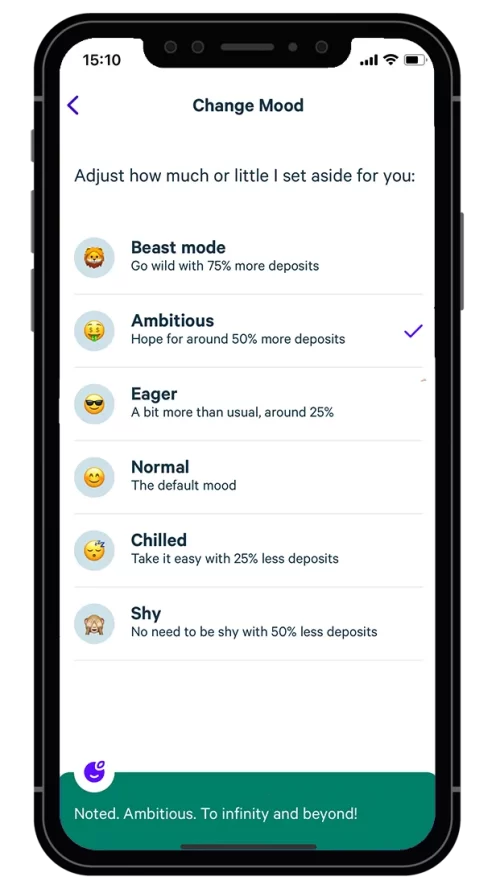
There are six moods to choose from ranging from Shy which will deposit the minimum recommended amount, to beast mode, which will maximise your deposits. Whether emotions should mixed with savings, is another topic entirely, but the idea is that this ‘gamification’ will help you safe more in the long run. Personally, I like it, and it’s no different from choosing pension investments based wordings for risk.
Plum interest pocket
Plums interest earning pocket is basically an instant savings account, offering earn 3.51% AER, and same day withdrawals. The savings account is actually run by Investec, and as such your deposits are FSCS protected.
While better than the regular Plum pocket, the best instant and easy access savings accounts are now paying up to 4.84% so you’re actually leaving money here, especially considering that Chip (the leading easy access account) also offers automatic savings and deposits.
Plum debit card
Subscribers to Plum’s Ultra and Premium plans are eligible for a free Plum card (which is 100% biodegradable by the way). You can’t spend directly from a Plum pocket though. The card needs to be topped up first, which is a shame.
The Plum card can be used anywhere Visa is accepted, and card users benefit from fee-free foreign spending, and the Visa daily exchange rate. That being said, those wanting to really maximise their spending power abroad, should check out our guide to the best cards to spend abroad.
Whilst the spending from a savings account might seems at odds with Plum’s mission, it makes sense when you consider that paid users can have multiple pockets, and use them to save for big ticket items like holidays.
It is worth mentioning, that money moved to the Plum card is not protected by the FSCS, but instead via ring fencing.
Plum Cash ISA
Plum launched its Cash ISA in 2024, and currently it offers a competitive 4.03% AER on deposits. That headline rate includes a 1.52% AER bonus for 12 months, and also requires you to keep a minimum of £100 in the account to avoid it dropping further to 2.5% AER.
For that, you’ll get a Cash ISA allowance of up to £20,000, and full FSCS protection on your deposits up to £85,000. Your actual deposits will be held with Citibank or in a Qualifying Money Market Fund (QMMF).
Discover the Plum Cash ISA
Give your savings a long-term Plum boost and don't pay a penny of tax on any of it up to £20,000 a year.
With a Plum Cash ISA you'll get 4.03% AER on your savings.
Investing with Plum

Plum offers both a stocks and shares ISA and a General Investment account, and you can open either from as little as £1.
There’s a lot going on in this section of the app, and it’s one area that I found to be quite cluttered, as it tends to throw together learning about investing, with the actual investing itself.
You can sort between funds or stocks, with popular, and thematic (those based on a particular theme e.g. tech, renewable energy) given prominence.
Those on the free account will find the choice of stocks and funds (in particular) pretty limited. This may play into your hands as a beginner, as you won’t necessarily be overwhelmed by the choices available.
More experienced investors may want to consider a paid account for more choice, but in my opinion would be better off using a dedicated investment platform.
In particular due to the fees Plum charges on investments made through its app. There’s a 0.45% per investment, plus a management fee for funds. That’s in additional to the monthly subscription free (for paid users).
Plum self-invested pension (SIPP)

Plum’s SIPP is provided by Quai Investment Services Limited. I know, I hadn’t heard of them either, but Quai is regulated by the FCA, and your pension will have FSCS protection.
When opening a SIPP, Plum gives you the opportunity to consolidate existing pensions, or start a new pension plan, but while you can save into a pension you can’t drawdown i.e. withdraw cash. That means once you reach retirement age (55 for private pensions) you’ll need move your SIPP to another provider.
Plum’s SIPP is centred around funds. In my main SIPP I also like to invest in individual stocks, but that isn’t necessarily advisable, so I can understand Plum’s approach here. The good news is there are variety of funds available for all risk levels. From UK dividends, to Natural resources, provided by funds such as Vanguard, M&G, Legal & General etc..
Just like regular Plum pockets, you can contribute to your SIPP from you auto-deposits, or regular savings.
Plum user experience (a personal view)
The Plum app is slick and modern as you’d expect. The setup is intuitive, but I did run into a number of problems (some of my own making)
On initial set up, literally within the first minute, I had a problem where I was unable to link an account. There had been a typo in the surname on the previous page. Yet even when I went back and corrected this, I was unable to link any accounts. It was as if the correction didn’t register. The fastest way around it, was to start again with a different email address.
The first bank account you add becomes your main bank account. Plum then uses this to take a weekly direct debit. I wanted to change this, yet despite adding another 5 accounts, none were showing up in the app. I had to fully quit the app and re-open it to get my account to show.
This became something of a recurring theme. Changes made within the app around bank accounts, just didn’t seem to register until quitting and restarting the app. Definitely not cool.
With my accounts added, I headed over the ‘brain’ section. This is where you set up your saving rules. The options here are all explained well, and allow a lot of configuration. I was however disappointed to find that some paid options were not marked as such before clicking on them.
For example, ‘Naughty rule’, and ‘The 1p Challenge’, both have an ‘Ultra’ logo next to them. This means that they are a paid feature, only available to Ultra subscribers. The ‘Rainy days’ feature, and ‘52-week challenge’ options, had no such icons next to them, yet clicking on them brings up the subscribe menu, as both features are only available to Pro level subscribers and above.
I didn’t mind that these features were for subscribers only (as had to take out a subscription later to fully test the app for the review anyway). What annoyed me was the inconsistency of labelling, and trying to trick you into clicking on a what looks to be a regular feature, only to then tell you it’s a paid option.
To Plums credit, it did fix this in a later version of the app. All of the paid features now include a ‘Pro’ or an ‘Ultra’ logo next to them so show which subscription level you need to unlock them.
Outside of this, the app experience is good. It’s fast and responsive, but it felt the team at Plum were trying a little too hard with ‘take drink’ and other well-being reminders. I get that they are trying make saving a little more fun, but I’d rather they just got on with the important things well, rather than trying to be cute.
Is Plum app safe?
Yes, Plum connects to your bank accounts via Open Banking, and offers funds and investment pockets that are all FSCS protected up to £85,000.
Funds are provided by well-known names in industry such as Blackrock and Vanguard, while deposits in pockets are held at Investec.
In addition, the app used 256-bit encryption, as well as biometric (face/fingerprint) ID, and of course, is regulated by the Financial Conduct Authority.
Bear in mind that investments can go up or down, so although your money is protected in event of a provider going out or business, it doesn’t mean you can’t lose money due to the value of your investments falling.
What to Plum users think?
Plum users rate it an excellent 4.4/5 on Trustpilot from over 4,000 reviews, and a generous 4.9/5 on Smart Money People based on over 10,000 user reviews. The majority of reviews mention the ease of saving, and investing.
while criticisms are based around the execution, and that some features that are free in other apps are charged for with Plum. Some also found the user interface problematic, and noticed bugs in the app, which matches my own experience. Others complained about withdrawing money, particularly from investments and interest pockets.
Is Plum worth it?
Plum is an interest app that promises a lot. It’s easy to get started and start saving and in that sense it’s great for people who don’t want to manage their own savings and investments or are generally bad at saving.
Personally, I didn’t find the AI behind the app particularly good, but that could be that as a tester for Money Saving Answers I have more bank accounts than I can count, and am regularly moving money around in what is quite a complicated financial set up. It’s something Plum couldn’t quite cope with. Especially as not all accounts could be linked.
If you fit the Plum usage case, which will typically be people with one or two bank accounts, having their salary paid in on a regular date, with regular bills and spending, then it’s going to be able to give you a more accurate figure of what you can save each month, and if you like, automatically deposit that to your designated pocket.
I found the app a little buggy, but generally easy to use, if a little cluttered, especially when it came to choosing investments. If you’re serious about investing there are better and cheaper apps available, see our Trading 212 review for example, but for beginners Plum offers an easy entry into that world.
Similarly, when it comes to savings interest there are better options. Chip for example offers similar automated savings, yet tops the charts as the highest paying instant access savings account.
That being said, there’s still a case for Plum, particularly for those who don’t want to think about savings, and are happy to let the app do its thing. Its safety net feature means you can have Plum maximise your saving deposits, while insuring you always have enough in your account for bills, plus a buffer amount you suggest.
Savings on autopilot
If you find it hard to save, Plum could be right up your street.
Give a free account a try and see how much you could save.